How to use your PeakDo Link-Power on iPhone without Bluefy
7 min read
If you own a PeakDo Link-Power and you have an iPhone, you've probably ended up using Bluefy— a third-party browser that PeakDo recommends because Safari doesn't support Web Bluetooth. It works. It's also slow to launch, loses connection on backgrounding, and looks nothing like an iPhone app.
Here's the swap. Install Link-Power Companion, the native iOS app for the LP1 / LP2 / LP+ family. Five minutes to migrate. You don't lose anything you set up in Bluefy — all the configurable settings live on the device itself.
What Bluefy actually is, briefly
Bluefy is an iPhone browser app that ships Web Bluetooth— the JavaScript API that lets a webpage talk to Bluetooth Low Energy devices. Safari doesn't implement it. Chrome on iOS technically can't either, because Apple forces all third-party browsers on iOS to use the Safari engine (WebKit). Bluefy gets around this by being purpose-built for the Web Bluetooth use case.
PeakDo's app is a Progressive Web App at pwa.peakdo.ca/link-power-1/. On Chrome desktop or Android Chrome, it Just Works. On iPhone, you need Bluefy to make the BLE part work, and you bookmark or "Add to Home Screen" the URL inside Bluefy to use it.
Why a native app changes the experience
Three concrete things you can't do in a browser-based client, no matter how clever the JavaScript:
1. Live Activities
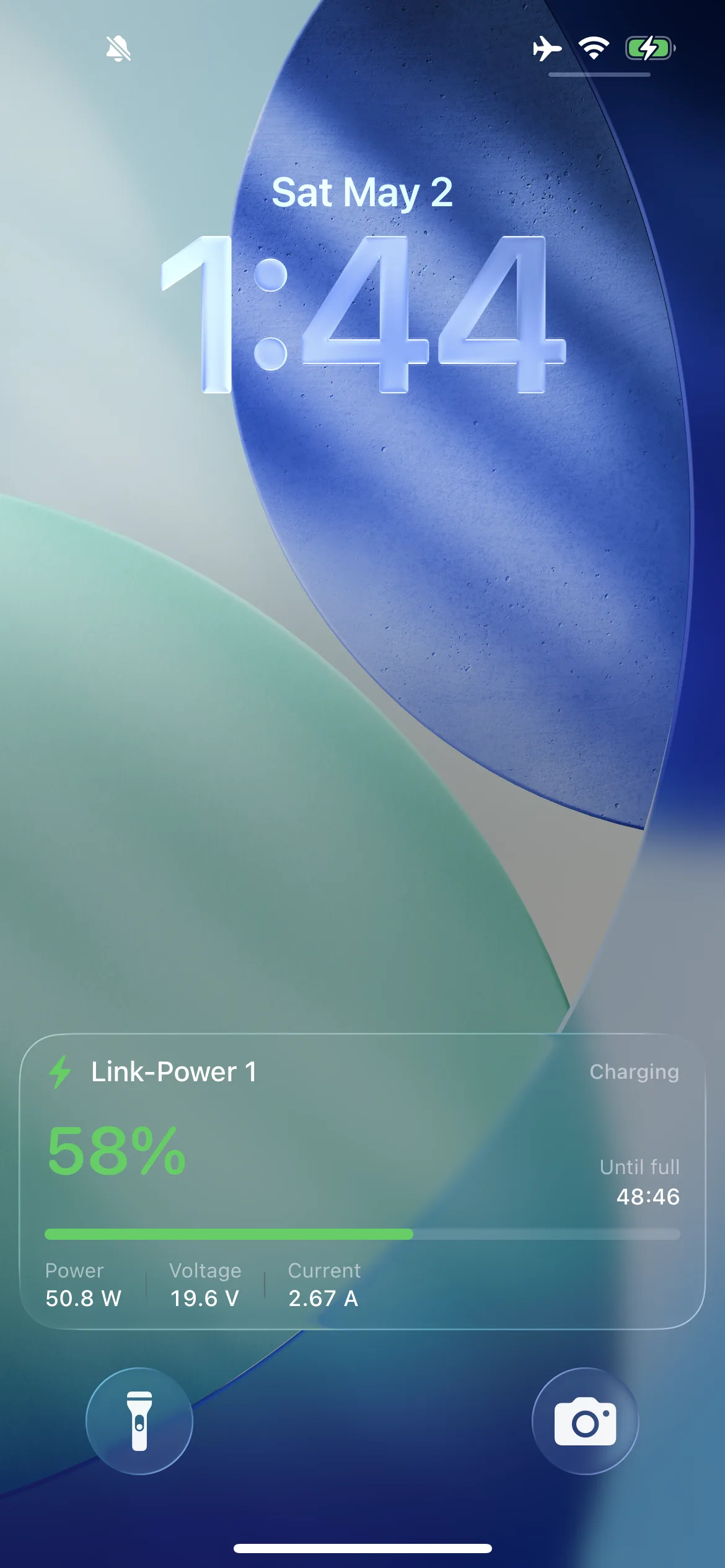
On iOS 16.1+, native apps can render a Live Activity — a persistent, real-time card on your Lock Screen and in the Dynamic Island. Link-Power Companion uses this to show charging state, current wattage, and runtime estimate without unlocking your phone.
Web Apps can't do this. The closest a PWA gets is a banner notification.
2. Lock Screen + Home Screen widgets
WidgetKit is a native iOS framework. Companion ships small, medium, and large battery widgets that show level, runtime, and flow state — color-coded green for charging, orange for discharging.
3. Reliable background reconnection
CoreBluetooth (the native iOS BLE framework) supports background-mode reconnection. The OS will wake your app to reconnect to a known device when it comes back in range. Web Bluetooth in Bluefy doesn't — when you background the browser tab or the screen sleeps, the connection drops, and you're scanning again next time you open it.
The user-visible result: with Bluefy, you wait 3–5 seconds between "open the app" and "see your battery state." With Companion, it's instant for the previous session, and reconnection happens in the background.
Will I lose my settings?
No. Here's what lives where:
| Setting | Stored where |
|---|---|
| USB-C global / input / output / runtime power limits | On the Link-Power device |
| Scheduled DC port timers | On the Link-Power device |
| Device clock | On the Link-Power device |
| BLE PIN (if enabled) | On the Link-Power device |
| Bluefy bookmarks / cached PWA | In Bluefy (irrelevant after migration) |
Translation: switch clients freely. Whatever you set up in Bluefy is already on the battery and will be visible the moment Companion connects.
Migration in 5 steps
- Install Link-Power Companion from the App Store. iOS 17 or later.
- Close Bluefy completely (swipe up to the App Switcher and flick it away). Bluetooth lets exactly one client own a connection at a time.
- Open Companion. Tap Scan. Pick your device. Existing settings appear immediately.
- Optional: long-press your Lock Screen, tap Customize, and add a Link-Power widget for at- a-glance battery state.
- Optional: delete Bluefy. Your battery doesn't need it.
When you might still want Bluefy
I'm being honest here. Two scenarios where Bluefy + the Web App is fine:
- You exclusively use a non-Apple device. The Web App is the cross-platform option PeakDo officially supports.
- You only ever change settings once at setup. If you set your power limits the day you unboxed the Link- Power and never look at it again, Bluefy is overkill but it works.
For everyone else — vanlife rigs, off-grid setups, photographers running gear off the LP2, anyone with a Starlink Mini sipping from a Link-Power on a daily basis — the native app is a real upgrade.
Either way:
Frequently asked questions
Why does PeakDo recommend Bluefy on iPhone?+
Because Safari doesn't implement Web Bluetooth, and PeakDo's official client is a Web App. Bluefy is a third-party browser that does implement Web Bluetooth, so it's the only way to use the PWA on iOS. It's a workaround, not a Safari fix.
Will my battery still work if I delete Bluefy?+
Yes. The Bluetooth-controllable settings are stored on the Link-Power device itself, not in Bluefy. Once you've configured the device — power limits, schedules, etc — they persist regardless of which client you use to read or change them later.
Does Link-Power Companion expose every setting Bluefy does?+
Plus more. Companion exposes everything the Web App / Bluefy can configure (power limits, DC control, scheduling, expert mode) and adds Live Activities, Lock Screen widgets, and CoreBluetooth-backed reliable reconnection.
Can I use both at the same time?+
Only one Bluetooth client can hold a connection to a Link-Power device at a time. Switch between them by closing one before opening the other. There's no data migration needed — settings live on the device.