The native PeakDo iOS app: monitor your Link-Power without Bluefy
6 min read
Search "PeakDo iOS app" and you land on a Web App. Open the QR code on the back of your Link-Power and you get the same Web App, plus a recommendation to install a third-party browser called Bluefybecause Safari can't talk to Bluetooth devices. It works, in the sense that you can read your battery state. It's also a janky experience for a $300+ portable power station you bought to be reliable.
This is the post for the search you just made. Link-Power Companion is the native iOS app for the entire PeakDo Link-Power family — LP1, LP2, and LP+. It's a real app: live battery telemetry on a Lock Screen widget, Live Activity that updates while you're using the device, a real timer editor, real DC and USB-C controls. It's free on the App Store and Google Play.
Why PeakDo doesn't ship a native iOS app
PeakDo's engineers chose a Web App that uses Web Bluetooth, a browser API that lets a webpage talk directly to BLE devices. It's a clever way to ship one codebase across Android, desktop, and iOS without maintaining a native app per platform. There's a real engineering rationale.
The catch: Safari doesn't implement Web Bluetooth, and Apple has no announced plans to. So on iPhone, PeakDo's solution falls back to Bluefy — a browser that does implement Web Bluetooth. You install Bluefy, paste the PWA URL, bookmark it, and there you go.
What you trade away by going that route:
- Live Activities and Lock Screen widgets.These are iOS native features. A web page can't put a live battery readout on your Lock Screen. A native app can.
- Reliable BLE reconnection.Bluefy reconnects on a best-effort basis. A native app uses CoreBluetooth's background reconnection APIs and is more durable.
- Native UI conventions.The Web App is functional but it doesn't feel like an iPhone app — wrong fonts, wrong navigation, wrong gestures.
- Store distribution.Updates ship through the App Store and Google Play; you're not pasting URLs into Bluefy every time you set up a new device.
What Link-Power Companion is
It's a SwiftUI iPhone app written directly against Apple's CoreBluetooth framework. Zero third-party dependencies, zero analytics, zero accounts.
The features that matter day-to-day:
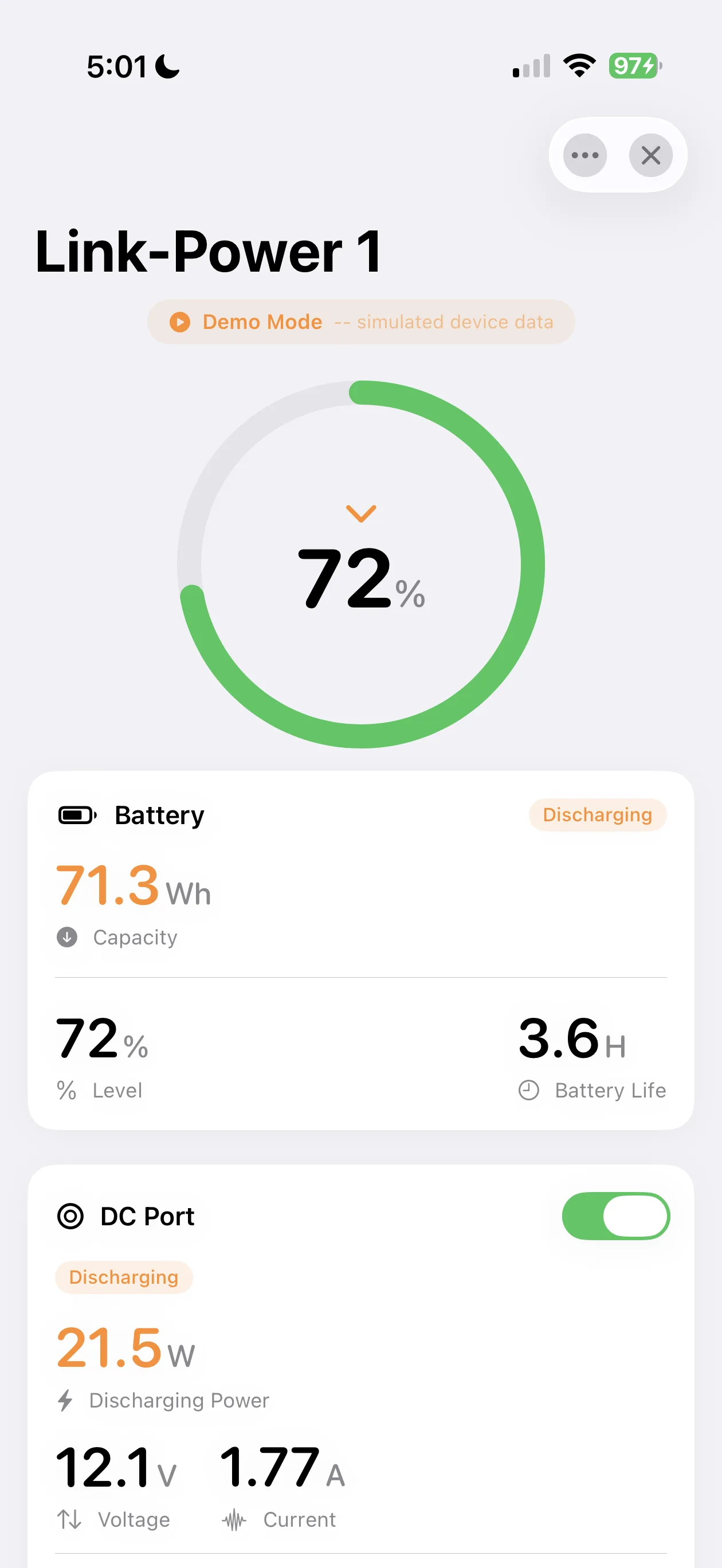
- One-tap BLE pairing. Scan, connect, auto-reconnect. Demo Mode if you want to poke around without hardware.
- Live battery dashboard. Capacity, level, voltage, current, runtime — streamed live from BLE notifications, not polled.
- DC port control. Toggle output, monitor power, flip on bypass mode for direct passthrough.
- USB-C insight. Charging vs. discharging state, port temperature, live wattage.
- Power limits. Configure global, input, output, and runtime caps from 30W to 100W.
- Smart scheduling.Up to 6 timers — one-shot, daily, weekly, monthly. Schedules execute on the device, so they fire even when your phone's in another room.
- Live Activities + Lock Screen widgets. Color-coded charging / discharging state, runtime estimate, live wattage. Glance, don't unlock.
- Date / time sync.Push your phone's clock to the device in one tap.
- Expert & Dev modes. Restart, shutdown, factory mode, BLE PIN — for the people who want to actually dig in.
What about the Web App? When is it the right choice?
I'm not going to pretend the Web App is useless. It has real strengths:
- Cross-platform. Works on Android, Windows, macOS, ChromeOS — same codebase.
- No install for desktop users.Open Chrome, paste a URL, you're in.
- Official channel. If you only trust first-party software, the Web App is the only PeakDo-blessed option.
Use the Web App if you're configuring a device from a laptop or only trust PeakDo's first-party client. Use Link-Power Companion if you're on iPhone or Android and you want a native UI that doesn't require a third-party browser.
Privacy & the "unofficial" question
Two things people ask in the App Store reviews:
"Is this PeakDo's app?"No. It is not affiliated with, endorsed by, or supported by PeakDo Tech, Inc. We're an independent project that reverse- engineered the BLE protocol from PeakDo's public Web App sources. PeakDo and Link-Power are trademarks of their respective owners.
"What data leaves my phone?" None. The app speaks the BLE protocol directly to your battery — no HTTP requests, no analytics SDK, no crash reporter calling home, no account system. Tasks, schedules, power limits — all stored locally.
Quick start
- Install Link-Power Companion from the App Store or Google Play.
- Power your Link-Power on. Confirm the BLE icon is showing on its screen (turn on Bluetooth from the device's menu if not).
- Open the app. Tap Scan. Tap your device when it appears.
- That's it. The dashboard streams live data, the Lock Screen widget appears after one minute of foreground use.
We have a more thorough walkthrough on the LinkPower 1 Quick Start and LinkPower 2 Quick Start pages. If you're currently using the Web App via Bluefy and want to migrate, see our guide to using PeakDo Link-Power on iPhone without Bluefy.
The bottom line
PeakDo built capable hardware. Their Web-App-via-Bluefy approach is technically reasonable but feels rough on iPhone — and it leaves Live Activities, Lock Screen widgets, and CoreBluetooth reliability on the table. If you're on iOS or Android, Link-Power Companion is the answer.
Frequently asked questions
Does PeakDo make a native iPhone app?+
No. PeakDo ships a Web App at pwa.peakdo.ca that you launch from a special browser called Bluefy (since Safari doesn't support Web Bluetooth). Link-Power Companion is the unofficial native app — built by the community and free on the App Store and Google Play.
Is Link-Power Companion safe to use?+
Yes. The app talks to your battery directly over Bluetooth — there are no servers, no analytics, and no accounts.
Which devices are supported?+
Link-Power 1 (LP1, model BP4SL3V1), Link-Power 2 (LP2, BP4SL3V2), and Link-Power+ (LP+, BP4SL3). Different models expose different feature sets — the app shows what's available based on what's connected.
Do I need to be near my power station to use it?+
Yes — it's Bluetooth, not internet. You need to be in BLE range (roughly 10 meters) to read telemetry or change settings. Scheduled timers run on the device itself, so they execute even when your phone is away.
Can I try it without a Link-Power device?+
Yes. Demo Mode simulates a connected battery so you can explore every screen — telemetry, DC controls, scheduling, power limits — without any hardware.